Material Maker
Material Maker 1.6
Material Maker is now available for download, with quite a few new features and improvements. And it seems williamchange has been carrying this release again.
Thanks a lot to everyone who support this project, by donating here or on Patreon, wishlisting Material Maker on Steam, contributing changes or bugfixes or submitting great materials on the website.
General
- Allowed closing named parameter dialog via window button (contributed by williamchange)
- Implemented vertical tabs in the Preferences dialog (contributed by williamchange)
- Improved debug console link navigation (contributed by williamchange)
- Enabled tab rearrangement for projects panel (contributed by williamchange)
- Made tab styles more consistent (contributed by williamchange)
- Updated icons to use SVG when possible (contributed by williamchange)
- Configured default FileDialog path to user's home directory (contributed by williamchange)
- Added a menu item to show examples folder (contributed by williamchange)
Graph view
- Updated graph navigation to retain subgraph offsets (contributed by williamchange)
- Added circuit/metro style (diagonal) connections (contributed by williamchange)
- Implemented node grabbing via G key (contributed by williamchange)
- Added drag and drop support for image parameter (contributed by williamchange)
- Made the close/minimize node buttons optional (contributed by williamchange)
- Improved node interaction when zoomed out (contributed by williamchange)
- Added port previews for group input nodes (contributed by williamchange)
- Improved remote parameters rearrangement (contributed by williamchange)
- Added edge scrolling when dragging connection (contributed by williamchange)
Library
- Show top-level section labels in the Library panel in bold (contributed by williamchange)
- Modified the "Update library item" action to keep the thumbnail (contributed by williamchange)
2D Preview
- Improved $node to use node title in 2D export (contributed by williamchange)
- Updated 2D preview to gizmos during transform until LMB is released (contributed by williamchange)
3D Preview
- Added alternative inputs for graph panning/camera orbiting (contributed by williamchange)
Nodes
- Controlled variations have been added as well as a few nodes that use this new feature.
The new controlled variations feature is similar to Variations, except it modifies 4 custom variables instead of the seed. Those variables are named $?1, $?2, $?3 and $?4, and can be used in real parameter expressions. So instead of controlling randomness, controlled variations can affect nearly all parameters.
A very basic use of controlled variations is the Controlled Variations node, that can set different values for one of the variables for each of its outputs. This makes it possible to obtain several variations of a subgraph without duplicating it. The image below shows a very simple example.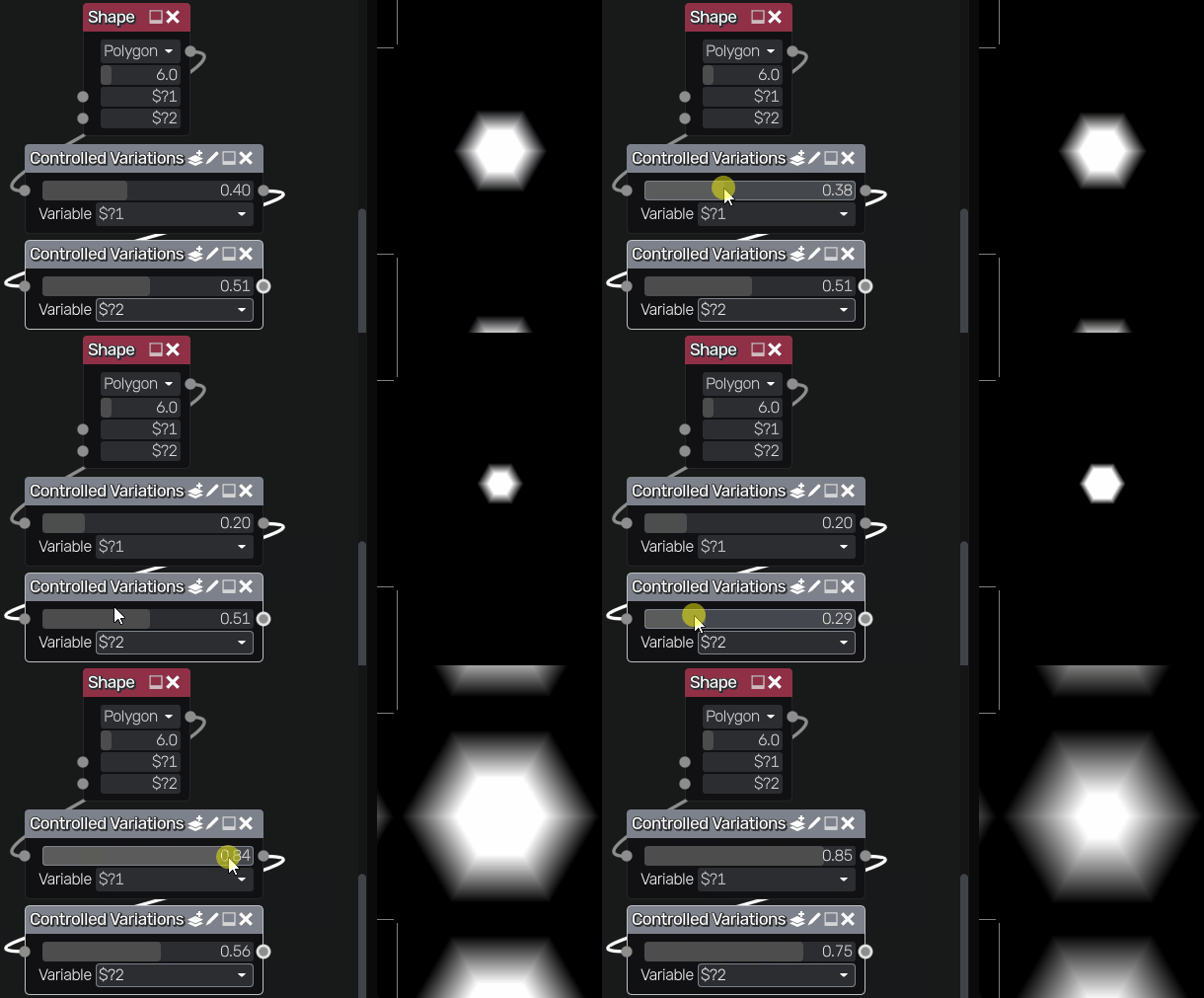
The real benefit of this feature comes with the Iterate Variations and the Layer Variations nodes. The Iterate Variations node just creates several variations of its input and combines them. The Layer variations nodes iterate similarly, but stack variations (using a mask or the alpha channel) instead. In both cases, the values of the variable are defined by an initial value, a final value and an increment. The image below shows an example created by williamchange.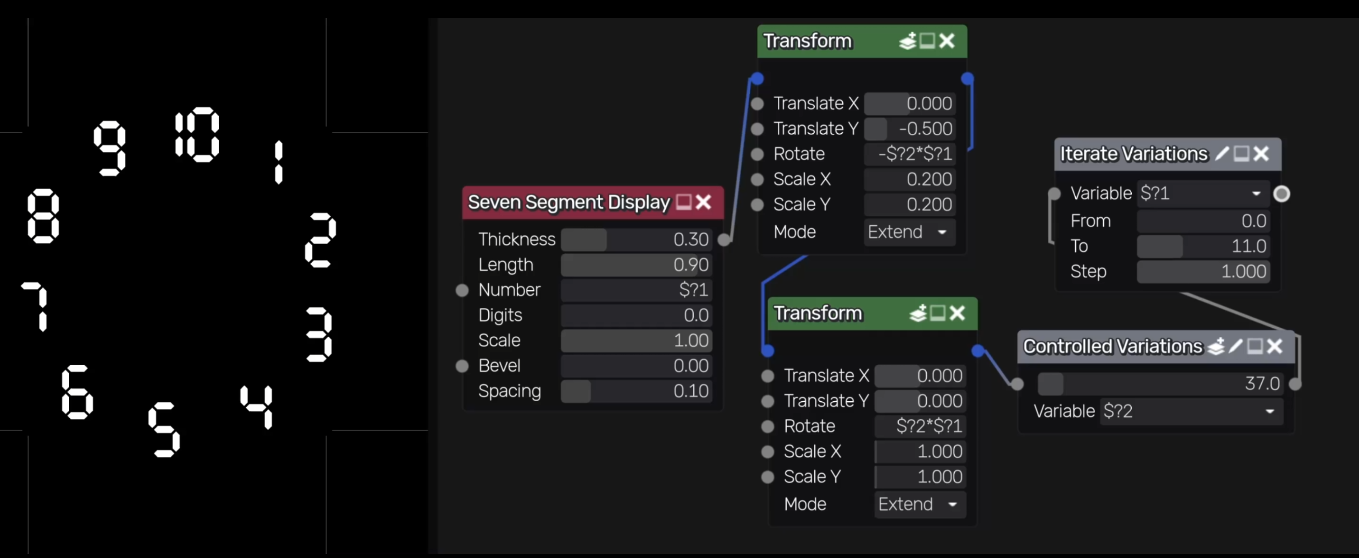
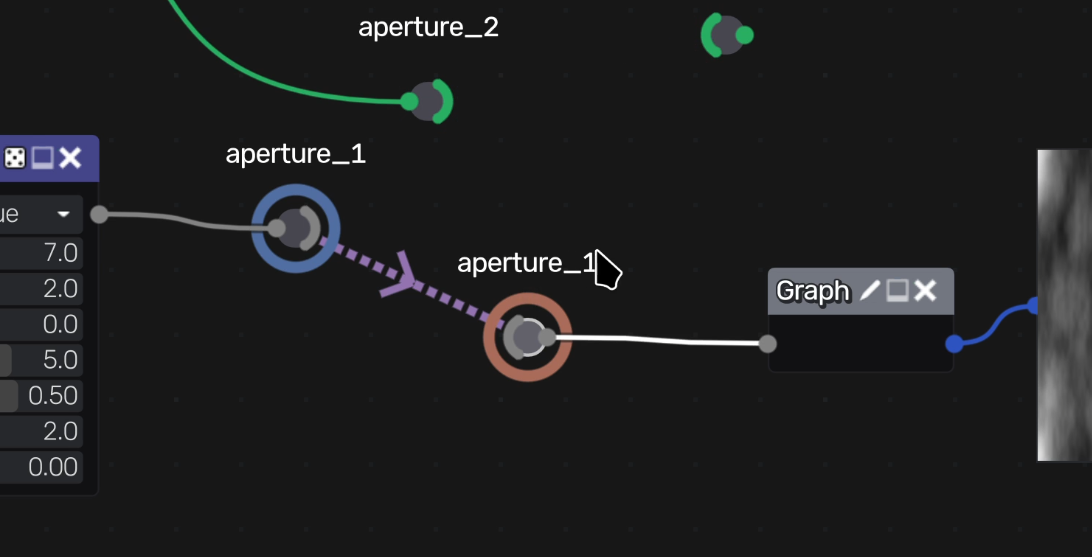
- New Aperture nodes have been implemented and they can be used to create named wireless connections between nodes (contributed by williamchange)
- Added a variadic Color Pick node (contributed by myaaaaaaaaa)
- Added a basic glTF exporter for static PBR materials (contributed by myaaaaaaaaa)
- Added lacunarity for FBM noise node (contributed by williamchange)
- Added gabor noise for FBM noise node (contributed by williamchange)
- Improved export node to support $ variables (contributed by williamchange)
Documentation
- Added documentation for user interface shortcuts (contributed by williamchange)
Bug Fixes
- Fixed crash when adjusting BPP in pixels node (contributed by williamchange)
- Fixed Morphology node Y dilation to use resolution (contributed by DevFika)
- Fixed SDF FBM node not displaying correctly (contributed by williamchange)
- Fixed opaque background for tooltip/popup menu panels (contributed by williamchange)
- Reintroduced AO export for Blender export target (contributed by williamchange)
- Placed graph UI (hierarchy and subgraph controls) above nodes (contributed by williamchange)
- Updated reroute/preview2d bg checker to match defaults (contributed by williamchange)
- Fixed console meta navigation on multiple clicks (contributed by williamchange)
- Fixed group parameters using default values from linked widgets (contributed by williamchange)
- Fixed hierarchy/subgraph UI position (contributed by williamchange)
- Fixed crash when opening named parameter editor (contributed by williamchange)
- Fixed zoom in/out buttons conflicting with node align (contributed by williamchange)
- Added check to prevent self-referencing in float parameter editor (contributed by williamchange)
- Fixed lattice, pixels, polygon views not centering (contributed by williamchange)
- Fixed default lattice point positions (contributed by williamchange)
Comments
Log in with itch.io to leave a comment.
one of the best tool man
Awesome ! And Greetings to williamchange for his amazing contributions !
Wow, reading these changes is very exciting! So many great additions!